Item Description
JA Square POS Billing System
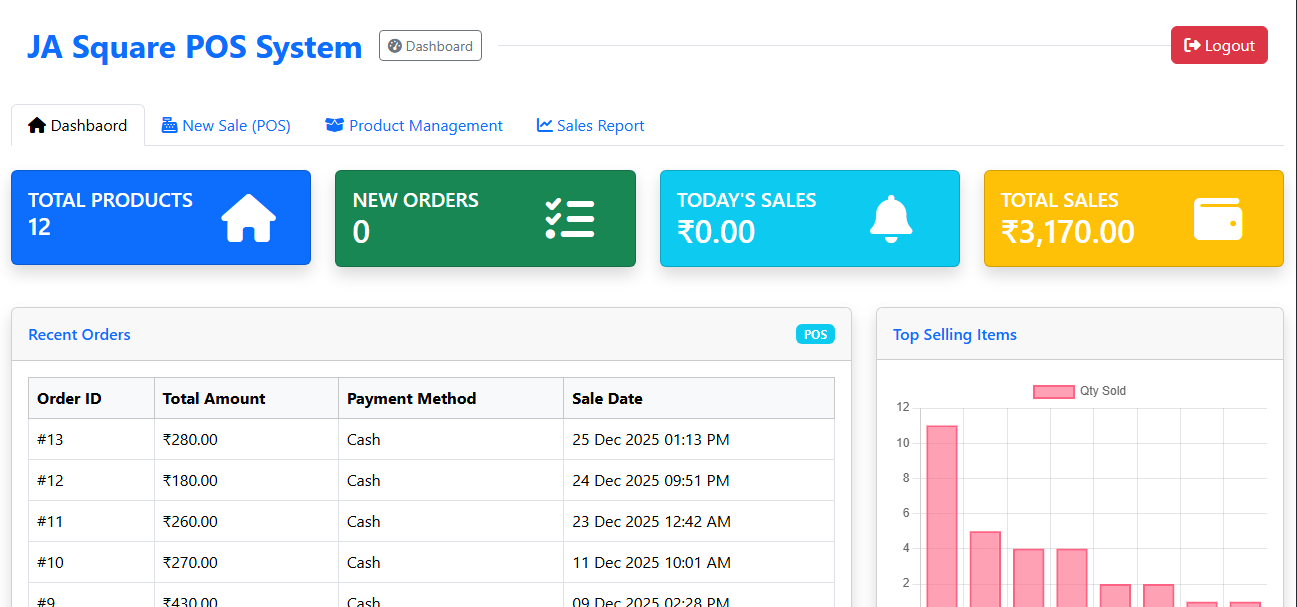
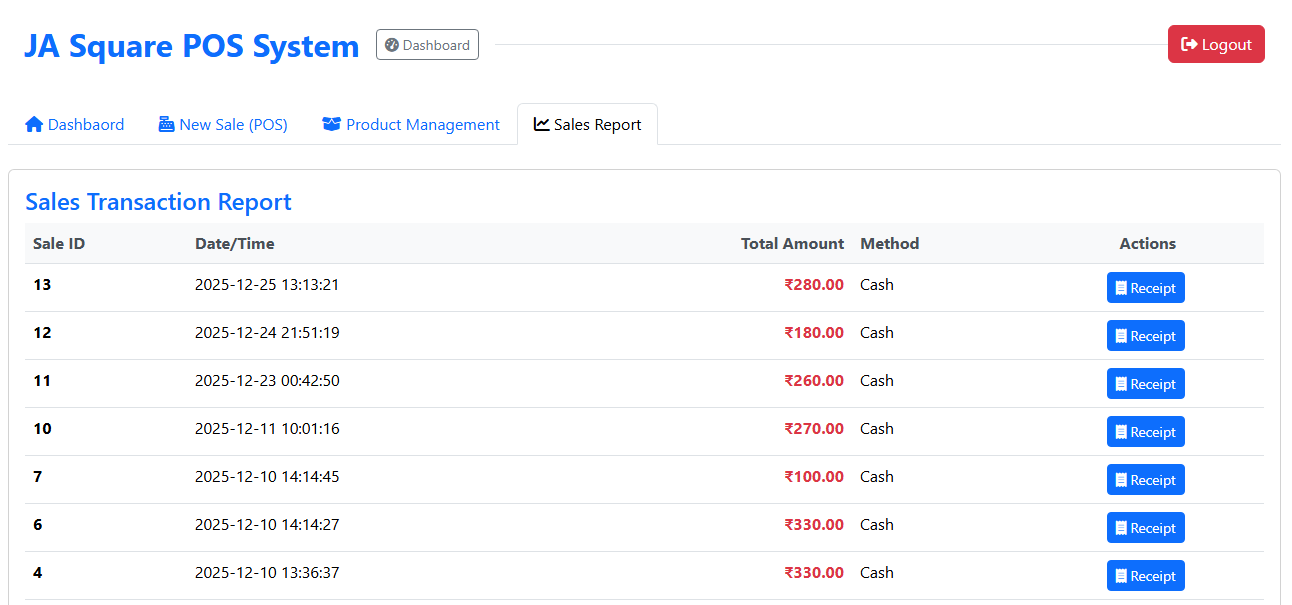
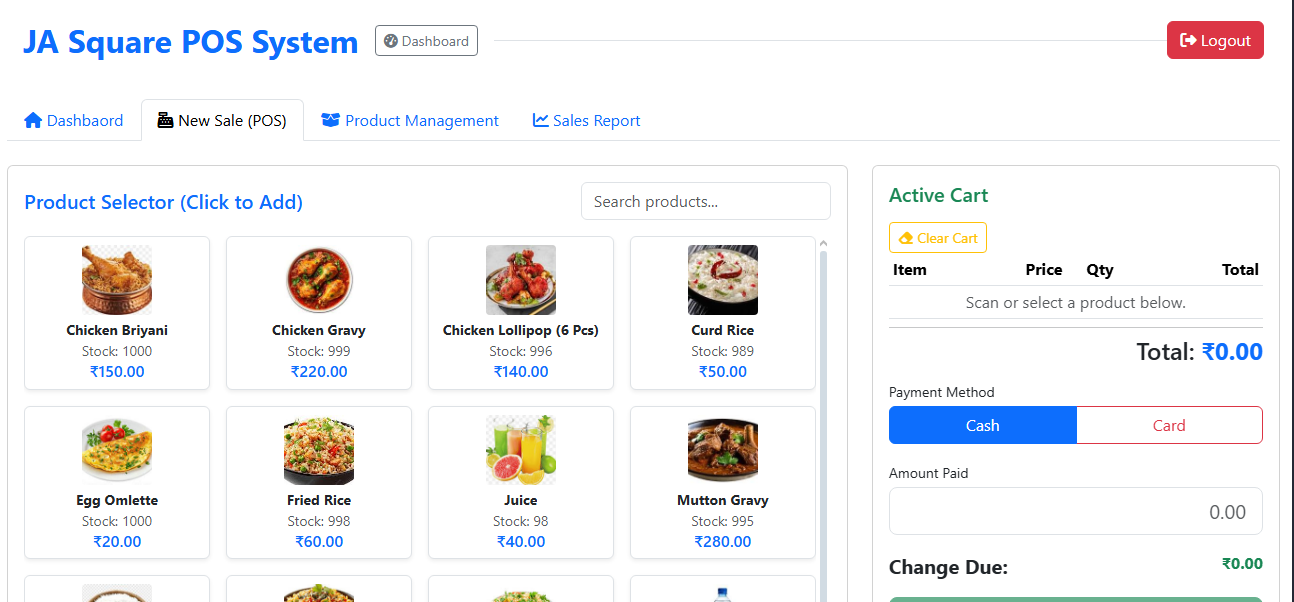
The **JA Square POS Billing System** is a specialized Point of Sale solution for restaurants, featuring **Face Recognition Login** for enhanced security and a dynamic dashboard for real-time sales management.
## 📂 Project Structure
The system is organized into the following core files:
* **`db_config.php`**: Database connection settings and automatic database creation (`jasquare_app`).
* **`create_tables.php`**: Database schema initialization, including the biometric-ready `users` table.
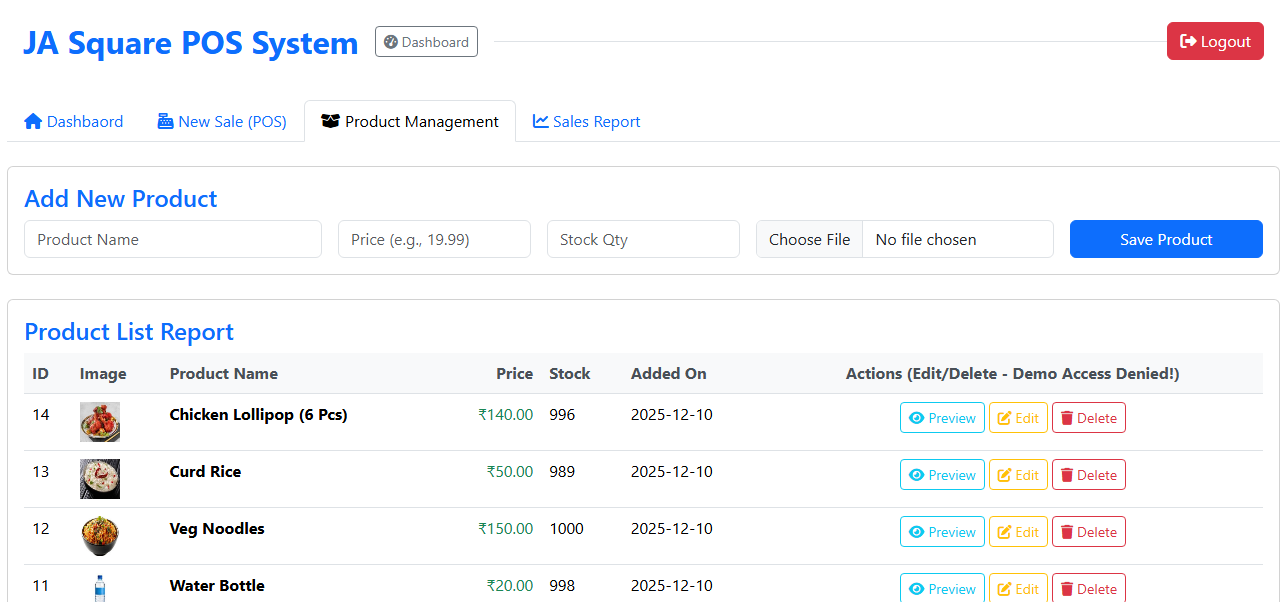
* **`pos_functions.php`**: The backend engine containing core logic for sales, inventory, and calculations.
* **`index.php`**: The login portal featuring Face Recognition authentication.
* **`dashboard.php`**: The central command center for POS operations and sales overview.
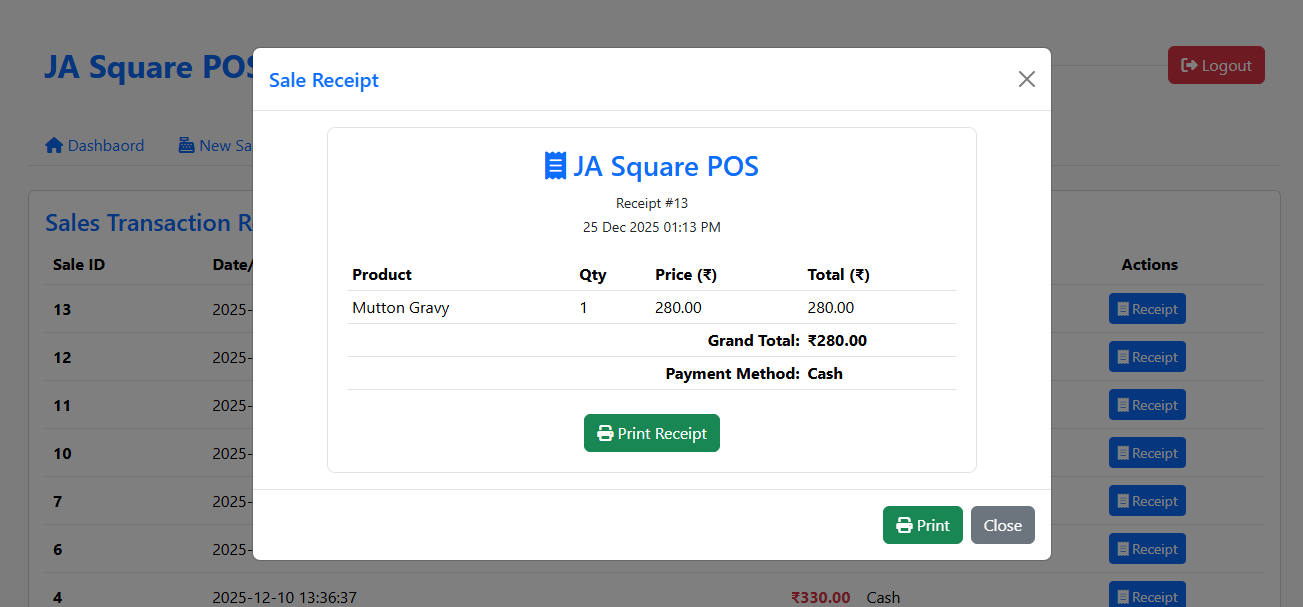
* **`receipt.php`**: Template for generating digital and printable order receipts.
* **`chart.js` & `script.js`**: Frontend logic for data visualization and dynamic UI interactions.
* **`style.css`**: Custom styling for the JA Square branded interface.
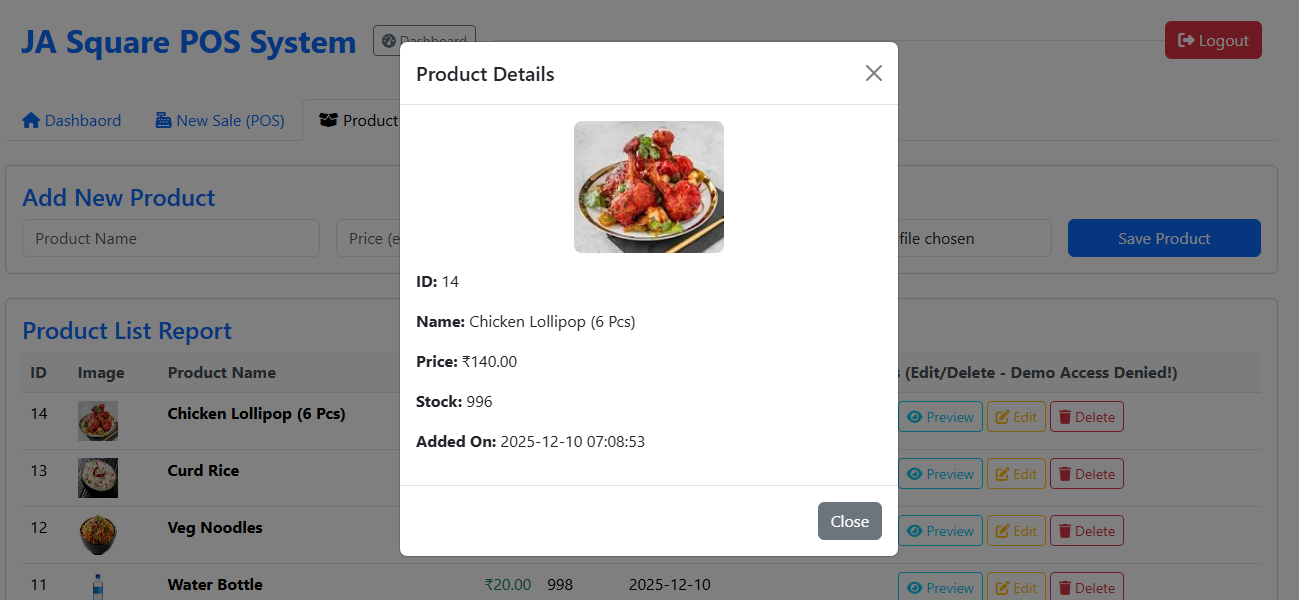
* **`uploads/`**: Directory for storing user profile images and product assets.
* **`logout.php`**: Secure session termination.
## 🔑 Key Features
### 1. Face Recognition Authentication
Unlike traditional systems, JA Square POS uses a 128-dimensional face encoding vector stored in the database to verify identities, ensuring that only authorized staff can access the terminal.
### 2. POS Operations
Managed via `pos_functions.php`, the system handles:
* Order processing and checkout.
* Dynamic calculation of totals and taxes.
* Integration with GPay and Cash payment methods.
### 3. Analytics Dashboard
Utilizing `chart.js`, the system provides visual insights into sales trends, popular menu items, and daily revenue directly on the `dashboard.php`.
## 🛠️ Installation & Setup
1. **Database Configuration:**
* Open `db_config.php` and update your local MySQL credentials (`host`, `username`, `password`).
* The system will automatically create the `jasquare_app` database on the first run.
2. **Schema Initialization:**
* Run `create_tables.php` in your browser.
* This will create the `users` table with biometric support and insert a default admin user:
* **Username:** `admin`
* **Password:** `admin123`
3. **Environment:**
* Ensure your server supports PHP 8.x and has the `mysqli` extension enabled.
* The system is configured for the **Asia/Kolkata (+5:30)** timezone.
---
The **JA Square POS Billing System** is a specialized Point of Sale solution for restaurants, featuring **Face Recognition Login** for enhanced security and a dynamic dashboard for real-time sales management.
## 📂 Project Structure
The system is organized into the following core files:
* **`db_config.php`**: Database connection settings and automatic database creation (`jasquare_app`).
* **`create_tables.php`**: Database schema initialization, including the biometric-ready `users` table.
* **`pos_functions.php`**: The backend engine containing core logic for sales, inventory, and calculations.
* **`index.php`**: The login portal featuring Face Recognition authentication.
* **`dashboard.php`**: The central command center for POS operations and sales overview.
* **`receipt.php`**: Template for generating digital and printable order receipts.
* **`chart.js` & `script.js`**: Frontend logic for data visualization and dynamic UI interactions.
* **`style.css`**: Custom styling for the JA Square branded interface.
* **`uploads/`**: Directory for storing user profile images and product assets.
* **`logout.php`**: Secure session termination.
## 🔑 Key Features
### 1. Face Recognition Authentication
Unlike traditional systems, JA Square POS uses a 128-dimensional face encoding vector stored in the database to verify identities, ensuring that only authorized staff can access the terminal.
### 2. POS Operations
Managed via `pos_functions.php`, the system handles:
* Order processing and checkout.
* Dynamic calculation of totals and taxes.
* Integration with GPay and Cash payment methods.
### 3. Analytics Dashboard
Utilizing `chart.js`, the system provides visual insights into sales trends, popular menu items, and daily revenue directly on the `dashboard.php`.
## 🛠️ Installation & Setup
1. **Database Configuration:**
* Open `db_config.php` and update your local MySQL credentials (`host`, `username`, `password`).
* The system will automatically create the `jasquare_app` database on the first run.
2. **Schema Initialization:**
* Run `create_tables.php` in your browser.
* This will create the `users` table with biometric support and insert a default admin user:
* **Username:** `admin`
* **Password:** `admin123`
3. **Environment:**
* Ensure your server supports PHP 8.x and has the `mysqli` extension enabled.
* The system is configured for the **Asia/Kolkata (+5:30)** timezone.
---
Item Description
JA Square POS Billing System
The **JA Square POS Billing System** is a specialized Point of Sale solution for restaurants, featuring **Face Recognition Login** for enhanced security and a dynamic dashboard for real-time sales management.
## 📂 Project Structure
The system is organized into the following core files:
* **`db_config.php`**: Database connection settings and automatic database creation (`jasquare_app`).
* **`create_tables.php`**: Database schema initialization, including the biometric-ready `users` table.
* **`pos_functions.php`**: The backend engine containing core logic for sales, inventory, and calculations.
* **`index.php`**: The login portal featuring Face Recognition authentication.
* **`dashboard.php`**: The central command center for POS operations and sales overview.
* **`receipt.php`**: Template for generating digital and printable order receipts.
* **`chart.js` & `script.js`**: Frontend logic for data visualization and dynamic UI interactions.
* **`style.css`**: Custom styling for the JA Square branded interface.
* **`uploads/`**: Directory for storing user profile images and product assets.
* **`logout.php`**: Secure session termination.
## 🔑 Key Features
### 1. Face Recognition Authentication
Unlike traditional systems, JA Square POS uses a 128-dimensional face encoding vector stored in the database to verify identities, ensuring that only authorized staff can access the terminal.
### 2. POS Operations
Managed via `pos_functions.php`, the system handles:
* Order processing and checkout.
* Dynamic calculation of totals and taxes.
* Integration with GPay and Cash payment methods.
### 3. Analytics Dashboard
Utilizing `chart.js`, the system provides visual insights into sales trends, popular menu items, and daily revenue directly on the `dashboard.php`.
## 🛠️ Installation & Setup
1. **Database Configuration:**
* Open `db_config.php` and update your local MySQL credentials (`host`, `username`, `password`).
* The system will automatically create the `jasquare_app` database on the first run.
2. **Schema Initialization:**
* Run `create_tables.php` in your browser.
* This will create the `users` table with biometric support and insert a default admin user:
* **Username:** `admin`
* **Password:** `admin123`
3. **Environment:**
* Ensure your server supports PHP 8.x and has the `mysqli` extension enabled.
* The system is configured for the **Asia/Kolkata (+5:30)** timezone.
---
The **JA Square POS Billing System** is a specialized Point of Sale solution for restaurants, featuring **Face Recognition Login** for enhanced security and a dynamic dashboard for real-time sales management.
## 📂 Project Structure
The system is organized into the following core files:
* **`db_config.php`**: Database connection settings and automatic database creation (`jasquare_app`).
* **`create_tables.php`**: Database schema initialization, including the biometric-ready `users` table.
* **`pos_functions.php`**: The backend engine containing core logic for sales, inventory, and calculations.
* **`index.php`**: The login portal featuring Face Recognition authentication.
* **`dashboard.php`**: The central command center for POS operations and sales overview.
* **`receipt.php`**: Template for generating digital and printable order receipts.
* **`chart.js` & `script.js`**: Frontend logic for data visualization and dynamic UI interactions.
* **`style.css`**: Custom styling for the JA Square branded interface.
* **`uploads/`**: Directory for storing user profile images and product assets.
* **`logout.php`**: Secure session termination.
## 🔑 Key Features
### 1. Face Recognition Authentication
Unlike traditional systems, JA Square POS uses a 128-dimensional face encoding vector stored in the database to verify identities, ensuring that only authorized staff can access the terminal.
### 2. POS Operations
Managed via `pos_functions.php`, the system handles:
* Order processing and checkout.
* Dynamic calculation of totals and taxes.
* Integration with GPay and Cash payment methods.
### 3. Analytics Dashboard
Utilizing `chart.js`, the system provides visual insights into sales trends, popular menu items, and daily revenue directly on the `dashboard.php`.
## 🛠️ Installation & Setup
1. **Database Configuration:**
* Open `db_config.php` and update your local MySQL credentials (`host`, `username`, `password`).
* The system will automatically create the `jasquare_app` database on the first run.
2. **Schema Initialization:**
* Run `create_tables.php` in your browser.
* This will create the `users` table with biometric support and insert a default admin user:
* **Username:** `admin`
* **Password:** `admin123`
3. **Environment:**
* Ensure your server supports PHP 8.x and has the `mysqli` extension enabled.
* The system is configured for the **Asia/Kolkata (+5:30)** timezone.
---